 7 min
7 minWhat you’ll learn in this article
You’ve probably heard people talking about MCP (Model Context Protocol) and how it’s supposedly “going to change everything”… but somehow, no one actually explains what it is. Sounds familiar?
Yeah, I thought so. There’s a lot of hype about how MCP will transform the integration world, but not much that breaks it down in plain English.
So in this article, we’re going to demystify MCP, explain why it’s such a big deal, and show, with real-world examples, how it can make building automations ridiculously easier, especially if you use integrator apps like Pluga.
Let’s dive in.
How MCP works
If your daily workflow involves juggling a dozen tabs and apps, Trello, Slack, spreadsheets, your CRM, and more, you know how much time that eats up. Time that could be better spent actually growing your business.
Now imagine being able to just ask your favorite AI (like ChatGPT) to organize all that for you.
Commands like:
- “Create a task in Trello for the marketing team.”
- “Send a Slack message letting everyone know the meeting’s starting.”
- “Add today’s numbers to my Google Sheets spreadsheet.”
Sounds like something out of a sci-fi movie? Well, it’s already happening, thanks to MCP.
The coolest part is that it all happens right inside your chat with the AI. You can drop the command in directly or arrive at it naturally during the conversation, and the AI will handle it by triggering the connected app.

That’s the magic: despite the fancy name, MCP is built on a simple but powerful idea, a universal standard for connecting AIs to everyday apps in a seamless, scalable way.
What exactly is MCP, and why does it exist?
The Model Context Protocol is an open standard that works like a “universal connector,” allowing AI models (like large language models, or LLMs) to access external data and apps in real time.
But before we dive deeper, let’s rewind a bit, and talk about APIs.
APIs vs. MCP
Before MCP came along, systems talked to each other through APIs.
Think of APIs like restaurant waiters: you place an order, and the waiter (the API) goes to the kitchen (the system) to get exactly what you asked for. Each request is handled one by one, even if you’re trying to have an ongoing “conversation” between apps or AI models.
But what if you wanted to connect multiple AIs to multiple apps?
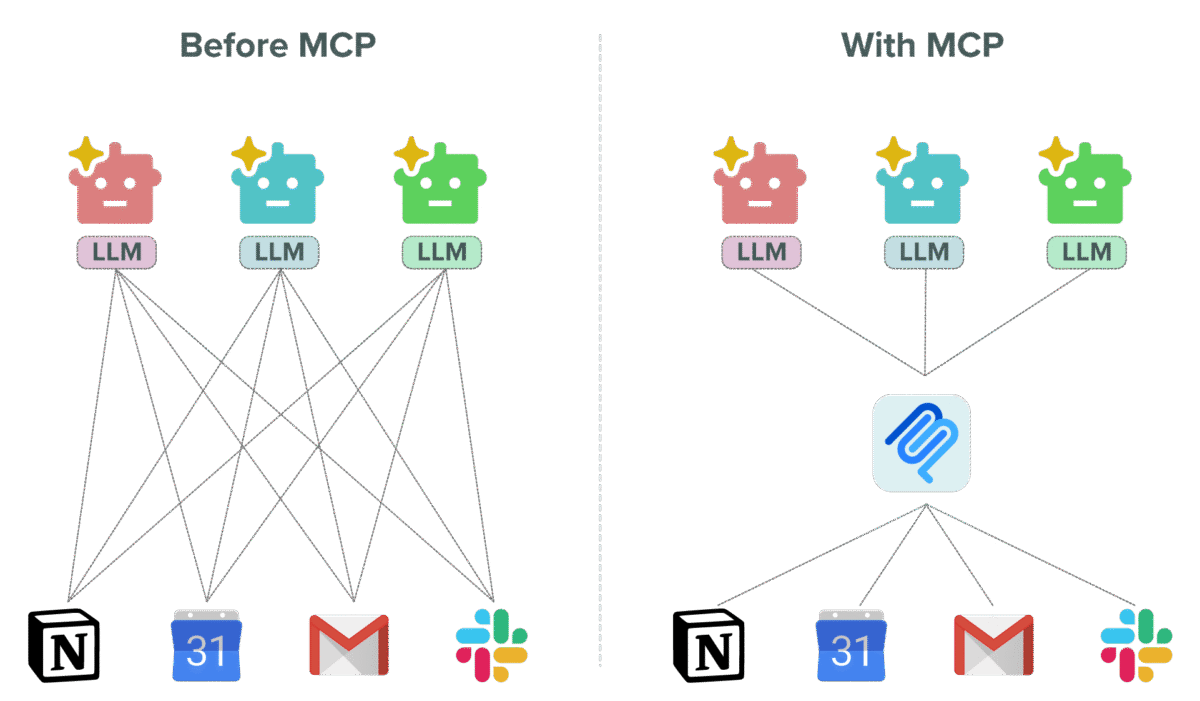
Using APIs alone, connecting 5 AI models to 5 apps would require 25 different integrations.
That doesn’t scale.
And that’s exactly the problem MCP was built to solve.
So, how does MCP work?
MCP is structured around two main layers:
- Client: This is your AI (ChatGPT, Claude, etc.), the one you’re chatting with.
- Server: This is where all the available apps and actions are stored (like Pluga).
In practice, you talk to your AI as usual. During that chat, you can give it a command like “turn this into a Trello task,” and the AI passes that through the MCP client to the MCP server, which executes the action in the connected app.
The three pillars of MCP: tools, resources, and prompts
Inside this architecture, the server’s capabilities are built on three core elements:
- Tools: Actions the AI can perform, like “write a sales proposal in Google Docs” or “add a row in Google Sheets.”
⚠️ Important note: the AI can use these apps, but it decides when and how to use them based on what you ask for.
- Resources: Information sources the AI can read (but not modify), like manuals or company files. They help the AI give more accurate, context-aware responses.
- Prompts: Predefined instructions or templates that guide the AI, like a “code review checklist” or “brainstorming guide.”
In short:
Tools do things, resources provide info, and prompts give direction.
Together, they let AI interact dynamically (and safely) with the outside world.
Why (and when) to use MCP
Every new tech trend comes wrapped in buzzwords and “revolutionary” promises, but not all of them actually deliver real value. So it’s natural to wonder:
Is this something my business really needs, or just another overhyped fad that’ll take forever to implement?
And that’s fair. For some companies, AI might not make sense yet, maybe their processes are already streamlined or their operations are small.
But if you’re looking for efficiency, less manual work, and faster decision-making, MCP (and AI in general) can be a total game changer.
Here’s what it can look like in action:
- Sales: Log new contacts directly in your CRM, no tab-switching needed.
“Create a new contact in my CRM with this name and email.” - Marketing: Have AI trigger campaigns or publish content automatically.
“Post this content on my company’s Instagram.” - Operations: Automate stock updates, invoices, or daily logs.
“Add today’s sales data to my Google Sheets spreadsheet, one per row.” - Project Management: Create or update tasks right in your PM tool.
“Add a Notion card titled ‘Review sales proposal’ and set the deadline to tomorrow.” - Team Communication: Let your AI handle quick announcements.
“Send a Slack message in #general saying the meeting was moved to 2 p.m.” - Data Analysis: Log KPIs or results automatically.
“Add a new row in Airtable with today’s metrics.” - Personal Productivity: Record notes or expenses in seconds.
“Add this week’s expenses to my budget spreadsheet.”
The real shift with MCP is that you never have to “break the flow” of your AI conversation.
You just write what you want in natural language, and MCP takes care of the technical side.
And here’s the best part: you don’t need to know how to code.
There are plenty of no-code and low-code platforms that make it easy to use MCP without a tech team.
With Pluga, it’s even smoother, you build an automation like usual, select Pluga MCP as the trigger, connect your apps, and voilà: ChatGPT can now perform that action automatically.
Using Pluga MCP in practice: step-by-step
Let’s see how simple it is to make ChatGPT send a Slack message using Pluga MCP.
- In Pluga, create a new automation.
- Choose Pluga MCP as the trigger and select “New MCP tool call.”
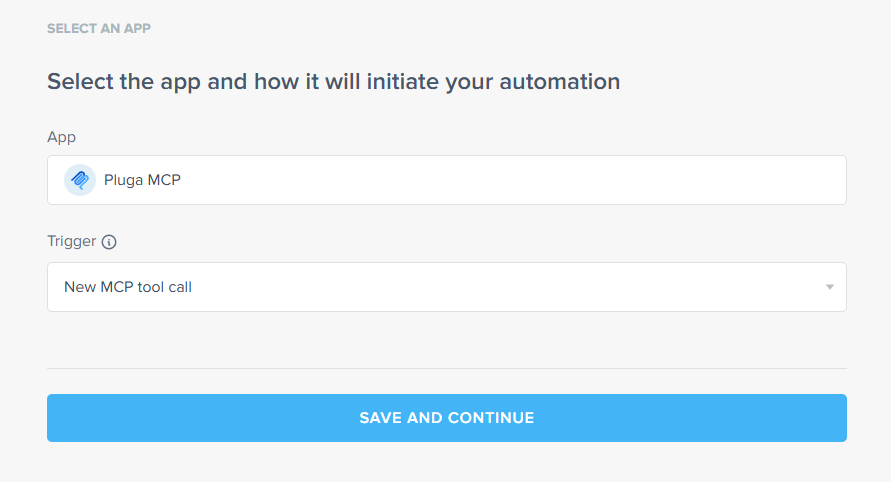
- Copy the integration URL.
- Add Slack as the app and pick the action “Notify in a channel.”
- Map the message field to “AI-generated data.”
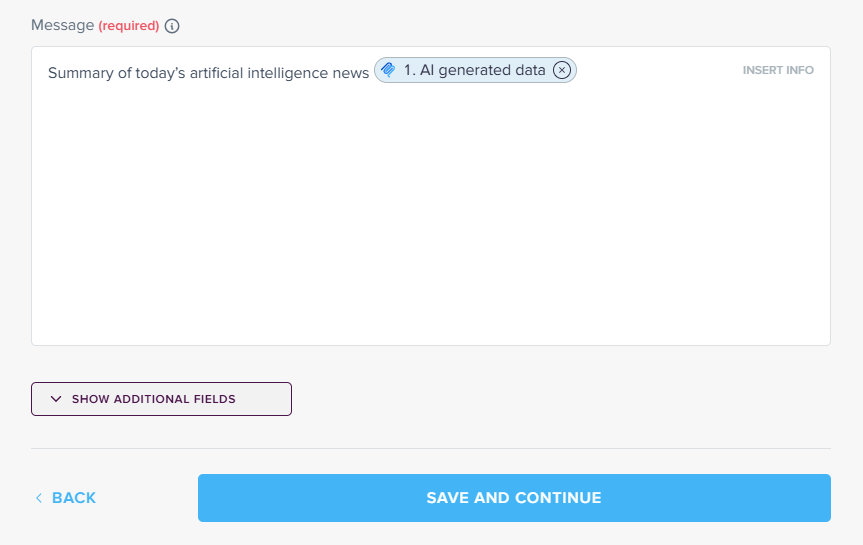
- Finish setting up the automation.
- In ChatGPT, go to Settings → Apps & Connectors, enable developer mode, and create a connector using the Pluga URL.
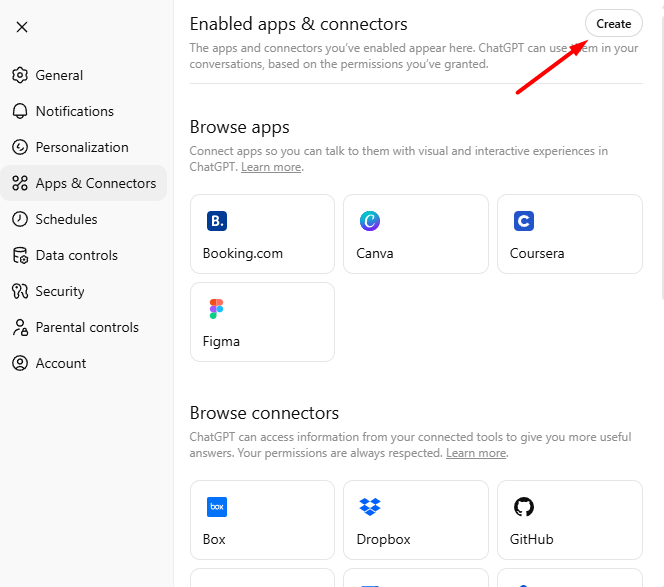
- Test it with:
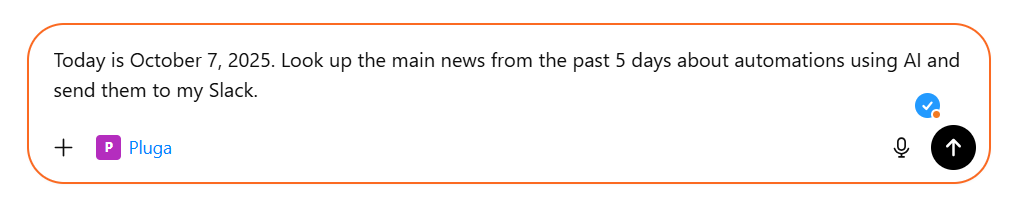
And just like that, boom 💥, the message pops up in your Slack channel.
You don’t have to switch tabs, install anything weird, or learn new apps.
Just keep chatting with ChatGPT, and when the moment comes, tell it to push the result straight to Slack.
💡 The same flow works for Trello, Google Sheets, Notion, Gmail drafts, you name it. The possibilities are basically endless.
The future of MCP
The MCP isn’t just another trendy acronym, it’s a fundamental shift in how systems and AIs communicate with each other. It solves the long-standing problem of integrations, enables natural language commands, and paves the way for smarter automations.
The trend is clear: in the near future, most online services will have official MCP servers. That means increasingly complex and powerful integrations, all without writing a single line of code.
Industry-specific servers, interoperability between different AIs, and full democratization of access are on the horizon. For small businesses, this will be a true game changer: fewer technical barriers, more time and focus on what really matters.
With Pluga MCP, entrepreneurs and teams can finally leverage AI to perform practical tasks with just a few clicks, no coding required.
And let AI, through Pluga MCP, handle the heavy lifting.
Keep in mind
MCP (Model Context Protocol) is an open standard that acts as a universal connector for AIs like ChatGPT to communicate with external apps in real time. It simplifies integrations and removes the need to build dozens of individual APIs.
MCP has two main layers:
Client: Where you chat with your AI (e.g., ChatGPT, Claude).
Server: Where the available apps and actions (like Slack or Trello) are hosted.
APIs: Require specific, one-to-one integrations. Connecting 5 AIs to 5 apps = 25 integrations.
MCP: Provides a universal standard — one connection can scale across multiple models and apps.
Tools: Actions the AI can take (e.g., “Add a row in Google Sheets”).
Resources: Data sources the AI can read (manuals, files, etc.).
Prompts: Instruction templates guiding the AI through tasks.
When you want to:
– Save time on repetitive work.
– Reduce manual effort in everyday processes.
– Create natural-language automations without coding.
Nope! Platforms like Pluga make it possible to set everything up with just a few clicks — no tech skills required.
Create an automation in Pluga and pick Pluga MCP as the trigger.
Copy the integration URL.
Connect the tool you want (Slack, Trello, Google Sheets, etc.).
In ChatGPT, enable connectors and paste your Pluga URL.
Done! You can now run natural-language automations in seconds.
Not at all. MCP is shaping the future of integrations. More and more online apps are adopting it, making automation smarter, faster, and totally code-free.