 9 min
9 minWhat you’ll learn in this article
Pluga is the most complete alternative to Relay.app: it covers multi-action automations, conditional filters, branching logic, AI-powered flows, and 120+ integrations. Follow the steps below to migrate before the shutdown deadlines.
- 1. Export your workflows, run history, and tables from Relay.app
- 2. List your flows by order of business criticality
- 3. Check if your tools are available on Pluga
- 4. Create a free account and rebuild your simplest flows first
- 5. Run the new flow in parallel before turning off Relay.app’s
💡 Free accounts close on Aug 15 and paid accounts on Sep 14. Export your data now before it’s permanently deleted.
If you’re using Relay.app, you’ve probably already seen the news: the platform is shutting down. In a LinkedIn post, founder Jacob Bank announced the decision, acknowledged its impact on customers, and outlined a clear timeline so users have time to export their data and transition their workflows.
Now is the time to stay calm, follow the migration timeline, and choose a reliable alternative that not only keeps your automations running, but also gives you access to even more features and flexibility, like Pluga.
The good news: Relay made it straightforward to get your data out. And once you’ve done that, migrating to a new platform doesn’t have to mean starting from scratch or losing the logic you spent months (or years) building.
This guide will walk you through exactly what to do, and show you how Pluga can cover the most majority of what you were running on Relay.
What Happened to Relay.app?
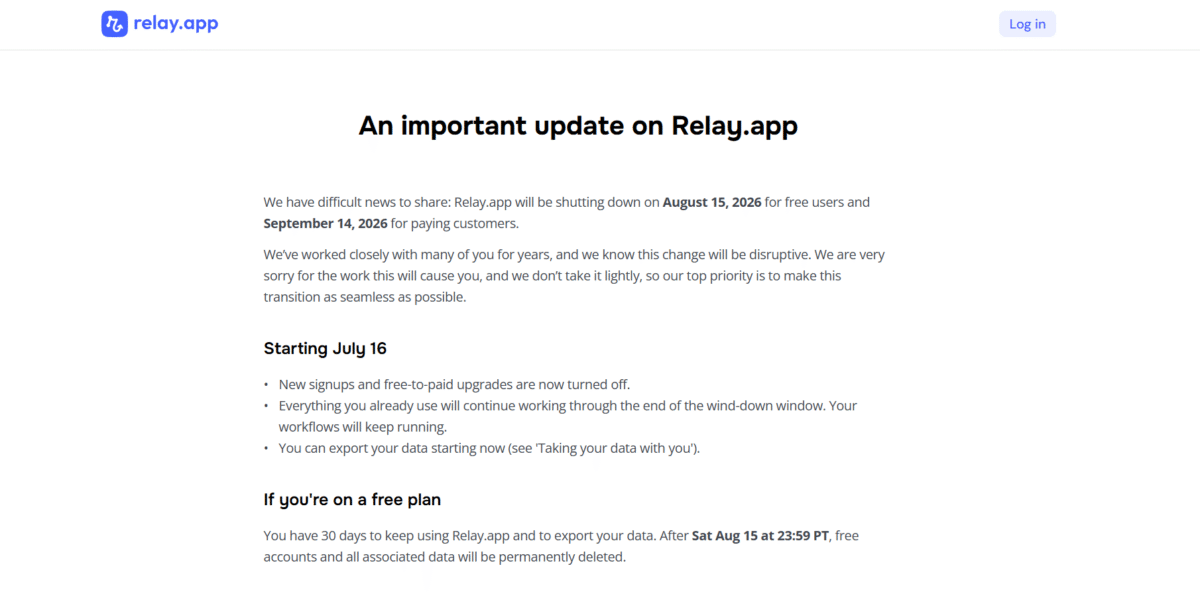
The Relay.app founder published a shutdown announcement on their official website. The reason for closing wasn’t disclosed, but the founder and team were transparent about timelines and committed to making the transition as smooth as possible for users.
Here’s the short version of what you need to know:
When Will Relay.app Accounts Be Shut Down?
Free accounts shut down on August 15, 2026 at 11:59 PM PT. After that date, all data is permanently deleted.
Paid accounts (subscriptions were automatically cancelled effective July 16) have free access through September 14, 2026 at 11:59 PM PT.
Paying customers also received an additional 25,000 steps and 10,000 AI credits during the transition period to help with the move. Annual plan holders will receive a prorated refund for unused time.
After those deadlines, all account data, workflows, tables, run history, credentials, is gone for good.
Check out the official announcement
What to do next: Export Your Relay.app Data Now
Before you do anything else, get your data out of Relay. The platform built export tools specifically for this transition, and you should use them while you still can.
Here’s what you can export:
Workflows and Sequences: available as JSON files (containing the exact structure of each workflow) and as AI-readable build prompts in plain language. The JSON preserves the technical structure; the build prompts are the more useful format if you’re rebuilding on another platform, since they describe what each workflow does in natural language that’s easy to reference.
Run history: full execution history available as a CSV export per workflow, or as JSON per individual run. This is useful for auditing your logic before you rebuild.
Tables: any structured data you stored inside Relay can be exported as CSVs.
To start the export, go to Workspace Settings inside your Relay dashboard and click Export workspace data. Depending on the size of your workspace, this can take up to 24 hours to generate, and the download link expires within 48 hours of being sent. Don’t wait.
For technical questions during the transition, Relay’s support team remains reachable at [email protected] through the end of the wind-down period.
Pluga: The Best Relay.app Alternative
Pluga is a no-code automation and integration platform with:
- A no-code automation and integration platform with 120+ app integrations;
- Advanced AI-powered features;
- Plans ranging from Free to Enterprise;
- Human support via live chat, email, and WhatsApp, even on the Free plan.
“When n8n felt overwhelming to new users, Relay made it easy to feel at home.”
- Relay.app user
“Kudos to the Pluga team! It’s so much easier to use than n8n. n8n takes a lot of patience, but Pluga is much more intuitive, it truly is no-code. And the support team is fantastic: responsive, attentive, and always ready to help.”
- Pluga user
Here’s a feature-by-feature breakdown.
A Builder That Doesn’t Require a Learning Curve
Part of what made Relay appealing was its accessibility. You didn’t need to be a developer to build meaningful automations. Beginners could build agents without ever having touched an automation tool before.
Pluga is built on the same philosophy. The visual builder is intuitive for first-timers and flexible enough for power users who want to handle more complex logic. If tools like Make, n8n, or Zapier felt like they required too much technical groundwork just to get a basic flow running, Pluga is built to feel immediately familiar.
Multi-Step Automations (Trigger + Multiple Actions)
Relay’s core pattern was a trigger followed by a chain of actions. Pluga supports the same structure: one event triggers a sequence of steps that can touch multiple tools in order. A new lead in your CRM can simultaneously notify your team in Slack, add a row to a Google Sheet, and send a follow-up email, all in one automation.
Conditional Filters
Not every trigger should fire every action. Pluga’s conditional filters let you define rules that control whether an automation continues based on the data that came in.
For example: only proceed if the lead source is “Google Ads,” or only run if the deal value exceeds a certain threshold. This mirrors the conditional logic Relay users relied on for targeted, precise automations.
Branching Logic with the Router
For workflows that need to split into different paths based on conditions, similar to Relay’s branching logic, Pluga’s Router handles this within a single automation. You define the decision points, and the Router directs each case to the appropriate downstream action. One workflow, multiple possible outcomes.
Integrations with the Tools You Already Use
Pluga connects to tools like HubSpot, Notion, Google Sheets, Slack, Gmail, Pipedrive, and many others, overlapping significantly with Relay’s integration library. Before migrating, it’s worth checking the apps available on Pluga to confirm the specific apps you use are available.
For apps that aren’t listed, Pluga supports webhooks and HTTP requests as a fallback connection method.
AI Inside Your Automations
Relay’s appeal to many users was its native AI capabilities. Pluga’s AI Kit lets you classify, extract, summarize, and translate information within a workflow, without writing prompts manually.
For automations that need more contextual reasoning, Pluga’s AI Agents can interpret intent, query knowledge bases, and execute actions across multiple tools in sequence. Pluga also supports integrations with Claude, Gemini, and ChatGPT for deterministic AI-powered steps.
Custom Logic with Code Blocks
If your Relay workflows included transformation steps, formatting strings, running calculations, or assembling payloads, Pluga Code lets you add Python or JavaScript blocks directly into an automation. This covers the cases where a standard integration action isn’t enough, without requiring you to leave the platform or build a separate service.
Scheduled Automations and Webhooks
Two of Relay’s most common trigger types map directly to Pluga: recurring automations via the built-in Scheduler, and external event-driven triggers via webhooks. If your workflows ran on a timer or responded to incoming data from other services, both patterns work in Pluga.
Support When You Need It
Pluga’s support team is available by chat, email, and WhatsApp, even on the free plan. If you’re working through a migration and hit a wall, you can reach them at [email protected] or through the site chat.
Practical Migration Examples
Here’s how three common Relay workflow patterns translate into Pluga.
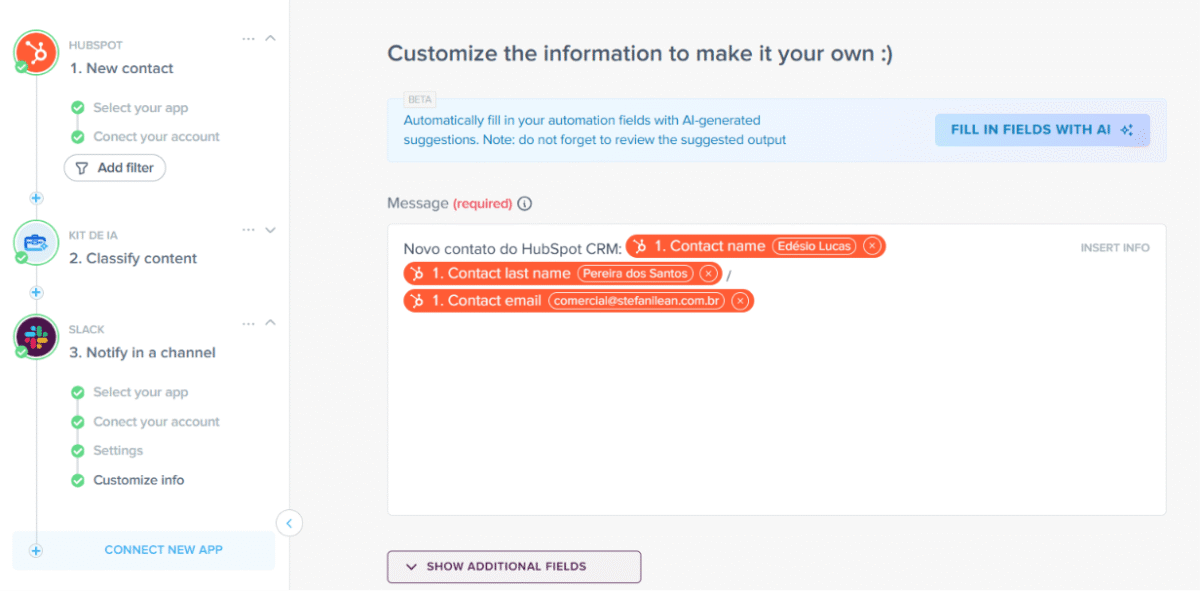
New contact created → AI classification → team notification
In Relay, this was a multi-step workflow with an intermediate AI step. In Pluga, the equivalent flow uses HubSpot as the trigger, the AI Kit to classify the incoming lead (by source, intent, or any other criteria), and Slack to deliver the notification to the right channel.
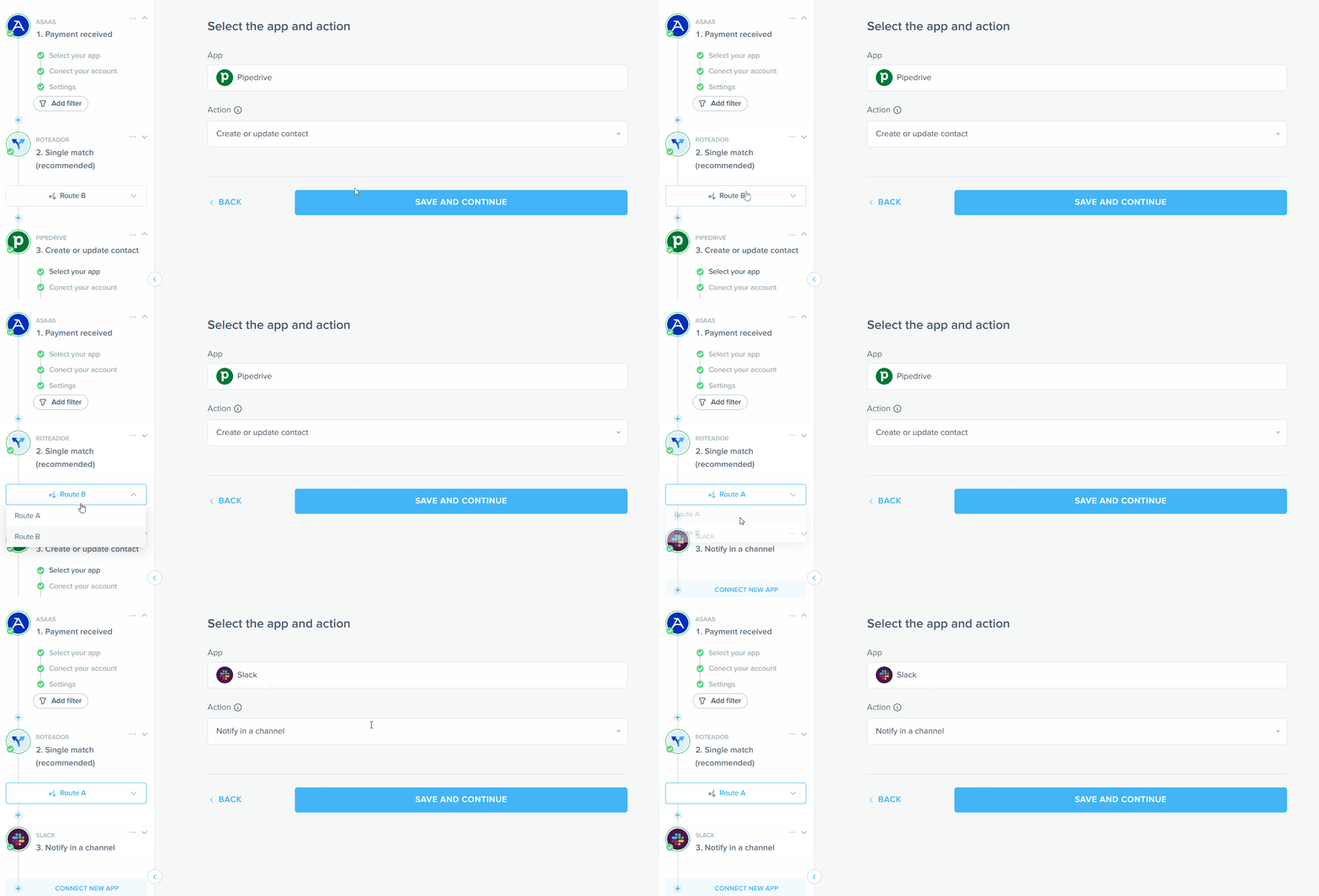
Payment Received → Router → Different Actions by Payment Method
In Relay, this used conditional branching. In Pluga, the Router evaluates the payment data and directs each case to the appropriate action, whether that’s generating an invoice, creating a CRM record, or sending a financial alert, all within one automation.
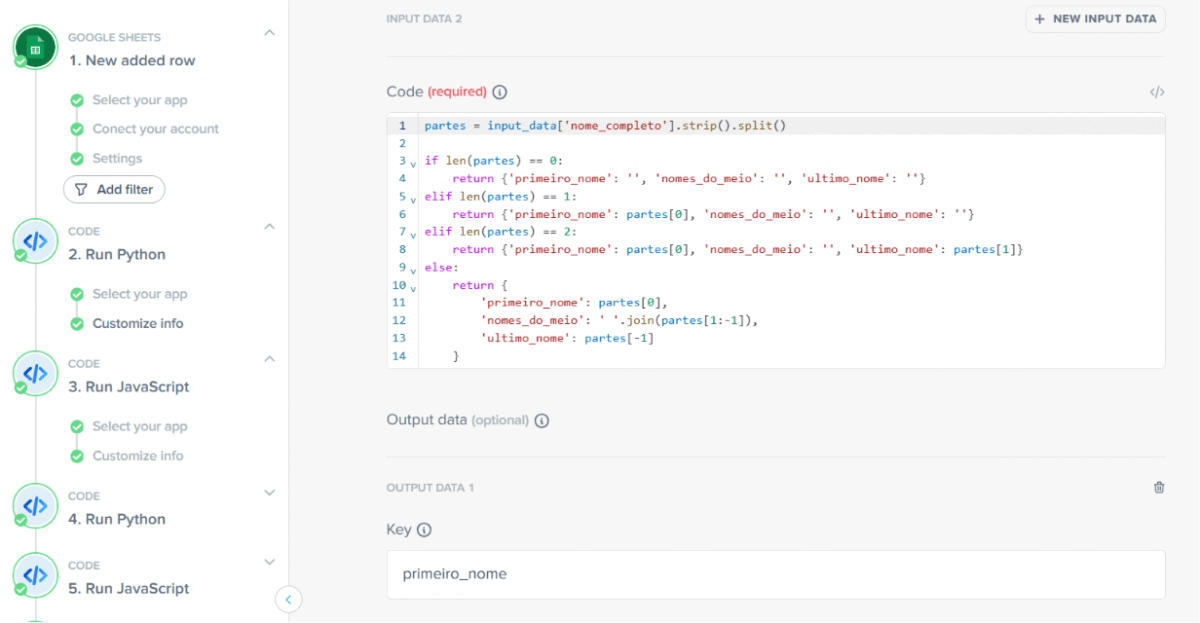
Workflow with custom data transformation
If your Relay workflow involved processing steps that manipulated data before passing it downstream, formatting text, running a formula, building a custom payload, Pluga Code lets you insert a Python or JavaScript block at that point in the flow to handle exactly that logic.
How to Migrate Step by Step
1. Export your Relay data immediately. Don’t wait, especially if you’re on the free plan with a deadline of August 15. The export takes time to generate, and you want your data in hand before anything else.
2. Rank your workflows by criticality. Identify which automations directly affect your business operations. Those get rebuilt first.
3. Check Pluga’s integrations. Go to Pluga Apps and verify that the apps you use are available. For gaps, webhooks or HTTP requests can fill in.
4. Create a free Pluga account and start with your simpler workflows. Getting comfortable with the builder on low-stakes automations makes the critical migrations go faster and cleaner.
5. Run your new Pluga workflows in parallel with Relay before switching over. A few days of parallel operation will surface any discrepancies in behavior before you make the transition final.
Move Your Operations Without Missing a Beat
Relay.app shutting down is disruptive, but it doesn’t have to derail your operations. The automations you built are still valuable, they just need a new home.
Pluga covers the core of what Relay offered: multi-step workflows, conditional logic, branching paths, AI-enhanced steps, scheduled triggers, webhooks, and integrations with the tools you’re already using. The one gap—native human-in-the-loop—has a workable alternative architecture.
If you’re ready to start today, create a free account on Pluga, explore the available templates, and rebuild your first workflow. The support team is here to help if you need a hand.
Frequently Asked Questions
Yes. The Relay.app team confirmed the shutdown on their official website. Free accounts close permanently on August 15, 2026, and paid accounts on September 14, 2026. All data is deleted after those dates.
It depends on your plan. Free users have until August 15; paid users until September 14. Relay provides an export tool that lets you download workflows as JSON and build prompts, run history as CSV, and tables as CSV. Start the export as soon as possible, it can take up to 24 hours to generate.
For most use cases, yes. Pluga handles multi-step automations, conditional filters, branching logic via the Router, integrations with tools like HubSpot, Notion, Google Sheets, Slack, and Gmail, and AI-powered workflow steps. The one feature without a direct equivalent is native human-in-the-loop, but there’s a viable workaround using two separate automations and an intermediate tool for the approval step.
Pluga doesn’t have a built-in pause-and-approve mechanism like Relay did. The standard approach is to split the workflow into two: the first handles all pre-approval steps and logs the item somewhere (like Google Sheets or a CRM record); the second triggers once someone marks the item as approved. It takes a bit of redesign, but it works for most approval scenarios.
Pluga has over 120 integrations, including many of the same tools Relay connected to: HubSpot, Notion, Slack, Google Sheets, Gmail, Salesforce, and Pipedrive, among others. To check whether a specific tool is available, visit Pluga Apps.
Yes. Pluga’s AI Kit lets you classify, extract, summarize, and translate data within a workflow without manually writing prompts. For more complex use cases that require contextual reasoning and multi-step execution, Pluga’s AI Agents can handle those flows. Pluga also integrates directly with Claude, Gemini, and ChatGPT for deterministic AI steps.
No. Pluga is a no-code platform, everything is configured visually. For cases that require custom logic (data transformations, calculations, building specific payloads), Pluga Code lets you insert Python or JavaScript blocks into a workflow without leaving the builder.
Pluga offers a free plan that includes up to 3 automations, plus a 7-day trial with access to all features. Paid plans start at $14/month.
The most straightforward path: export your Relay data now, rank your workflows by how critical they are to your business, check Pluga’s integrations at Pluga Apps and rebuild your simpler workflows first to get familiar with the platform. For anything critical, run the new workflow in parallel for a few days before turning off the Relay version.